
PIONEER AI
The helpful AI assistant made just for IT support
Ask in plain language. Pioneer AI has access to all the same data that you do and helps triage and troubleshoot faster.
Pioneer AI is built into the Outpost console. It works with your permissions, on your endpoints, tickets, and alerts, and it can even operate an endpoint’s screen in a remote session you have open.
30 days to explore No credit card required
REMOTE DESKTOP CONTROL
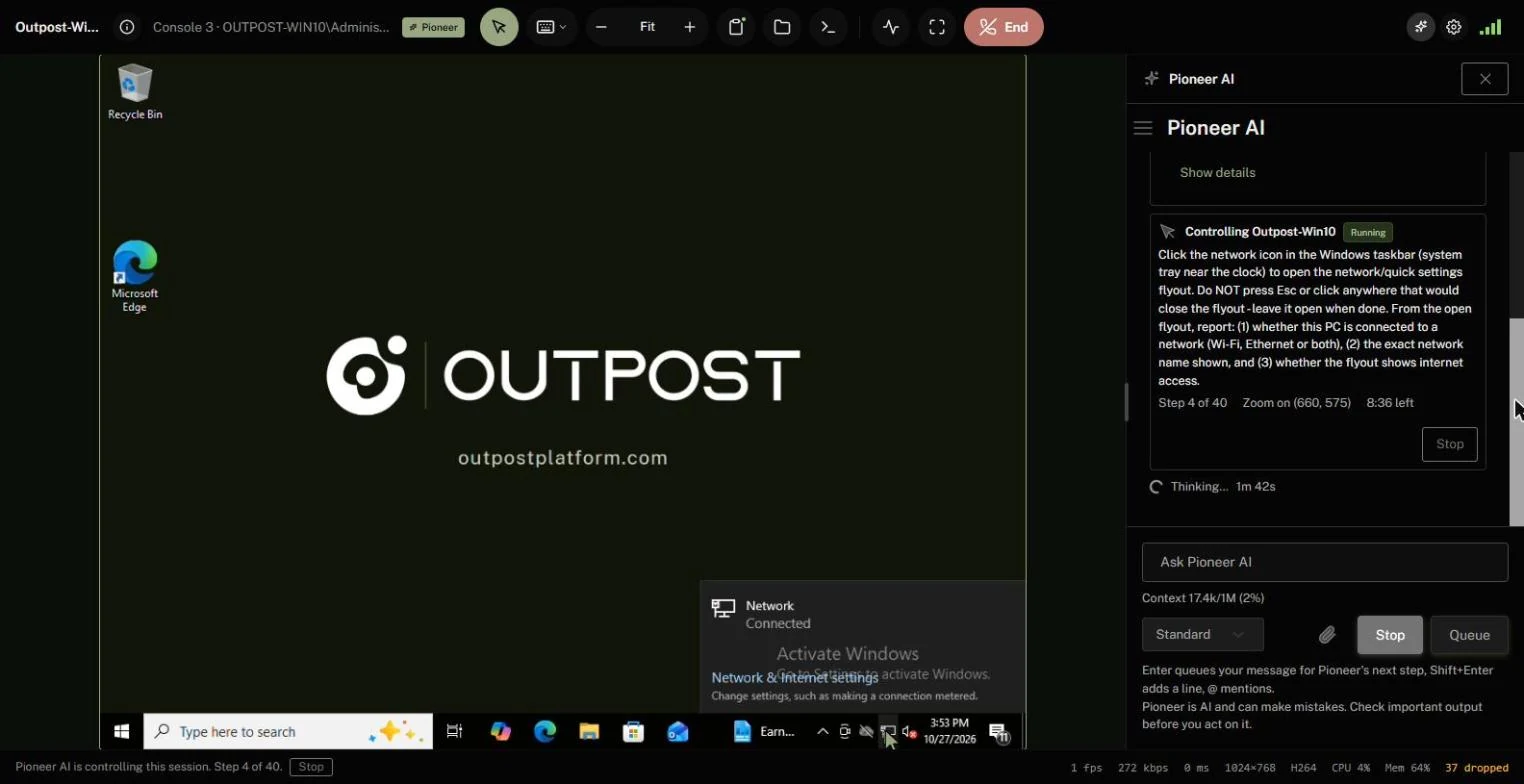
Hand it the mouse.
Watch Pioneer complete tasks for you.
HOW IT WORKS
For the work only a person at the desktop could do.
Some fixes live behind a control panel or an application with no command line. Ask Pioneer AI from the remote viewer, approve a task, and watch it read the screen and use the mouse and keyboard, step by step.
- One approval per task: the endpoint, the goal, and a budget of actions and minutes
- Its own pointer glides to each target first, so you see every click before it lands
- A click or key press of yours takes control back at once, and so does Stop
- Stops by itself at Windows sign-in, UAC, and lock screens
- Automatic approval never applies: a person approves every screen task
- Screenshots go to the AI model for each step and are never stored
- A profile setting and a role permission decide where it is allowed
SHELLS AND TERMINALS
Every command judged on its own.
In a shell, Pioneer AI rates each command before it runs. Commands that only read can run straight away, and anything that changes the endpoint waits for you.
- Read, change, or high impact, with the reason on the approval card
- Read-only commands run without asking, unless an owner turns that off
- Its shells appear in your remote terminal, where you can stop it or take over
- It can run a command in one of your own terminal tabs, and a high-impact one there always asks you
WHAT IT CAN DO
From diagnosis to the fix.
Pioneer AI knows which console page you are on, so “why is this one offline?” needs no more detail.
- Read inventory, alerts, patch state, and script results to find the cause
- Run a command or script, apply patches, deploy software, or wake an endpoint, after you approve
- Find, create, and update tickets, log time, and acknowledge alerts
- Build a table or chart from what it found
- Read a client’s network map, trace a path, and draw a diagram
- Search the web for current versions and advisories, with sources cited
- Plan large jobs, hand parts to sub-agents, and undo changes that can be reversed exactly
- Memories that carry notes between conversations, for you, one client, or everyone
GUARDRAILS
Your permissions.
Your approval.
Your record.
- It works with the permissions of the person asking, and nothing more
- Lookups run on their own. Every change waits for an approval card
- Never allowed: revealing secrets, playing recordings, exports, billing changes, and sign-in settings
- Every tool call is logged, and every change appears in the audit log
- Conversations are kept encrypted for 30 days by default and are never used to train models
- Zero Data Retention (ZDR) is available on the Enterprise and MSP plans
YOUR CHOICE OF MODEL
Outpost Cloud AI, or your own.
- Available on every plan
- Outpost Cloud AI, or your own OpenAI-compatible or Anthropic endpoint
- While Pioneer AI is in testing, each account gets a $5.00 monthly credit. Overage billing is still to be decided.
- On the MSP plan, turn it on or off for each client
- An MCP server lets an AI app you connect work as you, with the same permissions and approvals
SENSITIVE ENVIRONMENTS
Off means off.
Some organizations need to show that their data never reaches an AI model. Pioneer AI sends data only when a technician sends it a message, so with it turned off, nothing is sent to any model.
- Turn Pioneer AI chat off for the whole organization with one switch
- On the MSP plan, turn it off for every client, or force it off for the clients that need it
- Turn off AI screen control for any endpoint with a profile setting. When profiles disagree, off wins
- Compliance baselines such as HIPAA, PCI DSS, and CJIS leave AI to you: pair one with a profile that turns AI screen control off
- Vault credentials, recovery keys, and session recordings are never sent, even with AI on
- Keep conversations for as little as a day, or send requests to a model you run yourself
- Every change to these settings is recorded in the audit log
KEEP EXPLORING
One platform.
Every part connected.
MAKE IT YOUR OUTPOST
Your next clear view
starts with your first endpoint.
Bring a few Windows or Linux devices. Try the workflows. See how Outpost fits your team.
30 days No credit card required